Petstore: Store
The Store page is the console landing page, served at /console/store. It is a dashboard: a welcome card, a
"Recent orders" table whose header carries a strip of quick-stat tiles, a revenue tile, four charts and a
store-hours card. Every card reads its data from a small JSON endpoint on the same resource, so the page is a good
first look at how a console page is wired together. For the pattern in general, see
Building a Console Page.
What this page shows
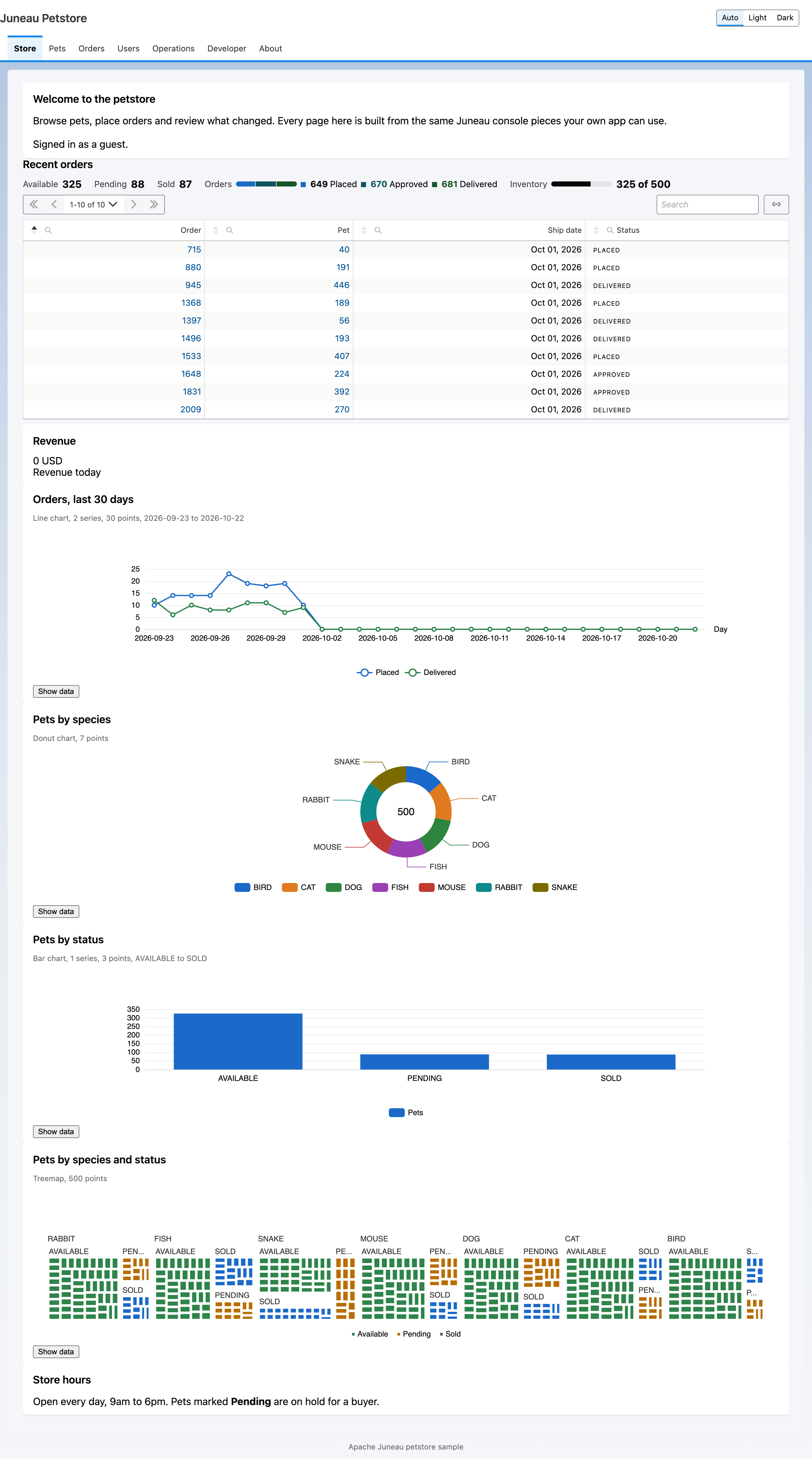
- A
datatablescard in client mode with aquickStatsstrip: three status tiles, a segmented order breakdown and an inventory meter. The tile values are computed once per request and handed to the template. - A
kpicard for "Revenue today". - Four
chartcards: a line chart, a donut, a bar chart and a treemap. The treemap opens the same edit dialog as the Pets table when you click a tile. - An
htmlcard whose body is loaded from a fragment endpoint, so the opening hours are plain markup with no chrome.
Template
The template is store.ftlh. Each card is a <@card> element inside one <@page>; chart cards carry their data
URL in src and their options as a small JSON-style body.
<@page tab="store" toolkit="views" init=["/console/dev/cards/petstore-cards.js"]>
<@card type="chart" id="by-status" title="Pets by status" src="/console/store/stats/status">
{ kind: 'bar', x: { field: 'status' }, series: [ { field: 'count', label: 'Pets' } ] }
</@card>
<@card type="chart" id="orders-trend" title="Orders, last 30 days" src="/console/store/stats/daily">
{ kind: 'line', x: { field: 'day', label: 'Day' },
  series: [ { field: 'placed', label: 'Placed' }, { field: 'delivered', label: 'Delivered', tone: 'ok' } ],
  onClick: { href: '/console/orders?state=day({day})' } }
</@card>
<@card type="html" id="hours" title="Store hours" src="/console/store/fragments/hours"/>
</@page>
The init script is a petstore-specific card script that the chrome loads after the toolkit. The trend chart links
each point to the Orders page filtered to that day, which is why the href uses a {day} placeholder.
Builder twin
The same page can be built in Java. StorePageBuilders.store returns a PageSpec, and request the page with
?builder to render it through that path instead of the template.
PageSpec.create().tab("store").toolkit("views").init("/console/dev/cards/petstore-cards.js")
    .card(ChartDef.bar("by-status").title("Pets by status").src("/console/store/stats/status")
        .x("status").series("count", "Pets").toCardSpec())
    .card(ChartDef.line("orders-trend").title("Orders, last 30 days").src("/console/store/stats/daily")
        .x("day", null, "Day").series("placed", "Placed").series("delivered", "Delivered", "ok")
        .onClickHref("/console/orders?state=day({day})").toCardSpec())
    .htmlSrc("hours", "Store hours", "/console/store/fragments/hours");
The two renderings are required to produce the same page contract. That is what the twin test pins; see Building a Console Page for the contract itself.
The data endpoints
StoreRest serves everything under /console/store.
| Endpoint | Returns |
|---|---|
GET /console/store | The page. |
GET /console/store/recent-orders | The ten newest orders, newest first. |
GET /console/store/stats/daily | {day, placed, delivered} for each of the last 30 days. |
GET /console/store/kpi/revenue | {label, value, unit}: the summed prices of pets whose orders were delivered today. |
GET /console/store/stats/species | {species, count} per species, zero counts included. |
GET /console/store/stats/status | {status, count} per pet status. |
GET /console/store/stats/pets | {id, name, species, status} per pet, for the treemap. |
GET /console/store/fragments/hours | The opening hours as markup only. |
Source and tests
Source: juneau-petstore/juneau-petstore-core, classes StoreRest, StorePageBuilders (in the pages package) and
the templates store.ftlh and fragments/store-hours.ftlh.
Tests: StoreRest_Test, StoreRest_EmptyStore_Test, PetstoreTwins_Test and PetstorePages_ContractTest.
See also
- Twin pattern: see 19.17. Template and Builder Twins.
- Petstore Console Tour: the chrome and navigation around this page.
- Petstore: Pets: the table the treemap edit dialog shares.
- Chart Cards: the chart kinds and options used here.
- Declarative Widgets: the widget vocabulary behind the tiles.
- Data Tables: client-mode tables.
- Building a Console Page: the end-to-end tutorial.