Building a Console Page
This is the end-to-end tutorial for adding a page to an admin console built on Juneau: a resource that serves the chrome, a navigation tree, a sortable and searchable table backed by a server-side data endpoint, and a test that pins the page contract. The example is a pet inventory page; substitute your own bean.
The reference pages cover each piece in depth. Read them when a step here raises a question.
- Admin-Console Chrome: directives, themes and the page contract.
- Rich Table Views: what a table card can do.
- DataTables Server-Side Processing and BeanQuery: the data endpoint.
What you are building
The result looks like the petstore's pets page: the chrome's header and navigation around one table card fed by a server-side data endpoint.
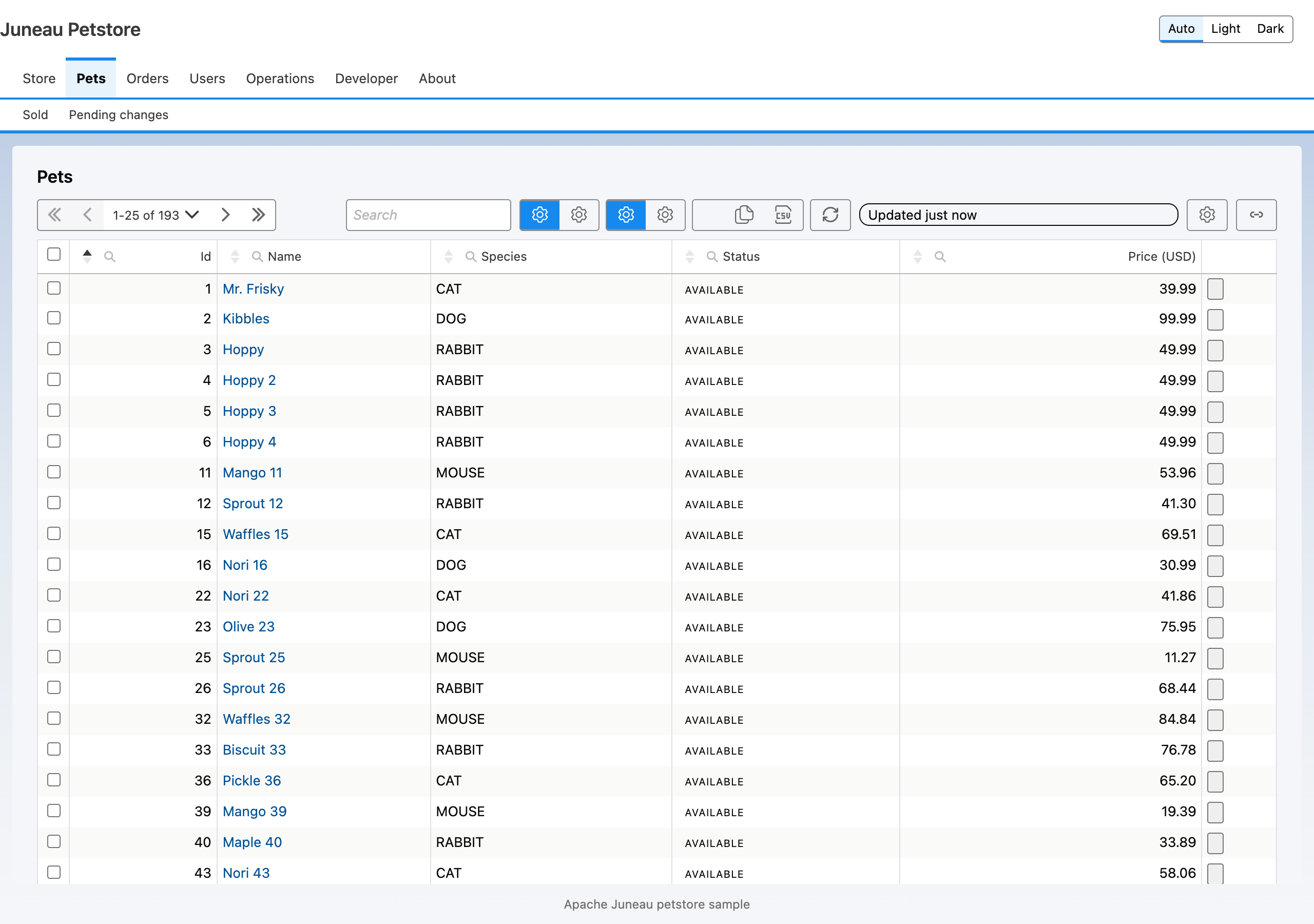
A console page is four cooperating parts:
| Part | Provided by |
|---|---|
| The chrome template (header, navigation, footer) | <@console> and <@navigation> in one shared FreeMarker template. |
| The page template (its cards) | <@page> with one or more <@card> elements. |
| The data endpoint | A REST operation returning DataTablesResults<T>, backed by BeanQuery. |
| The assets (CSS, JavaScript) | The mixins ConsoleChromeMixin, ViewsMixin and DataTablesMixin. |
<@page> is the outermost directive in a page template. It captures its body (the cards), then includes the chrome
template, which must contain <@console>. The server never renders the chrome as HTML; it writes a JSON page
contract into the document and the shell script juneau-console.js draws the header, navigation, cards and footer
in the browser.
Step 1: Dependencies
<dependency>
    <groupId>org.apache.juneau</groupId>
    <artifactId>juneau-console-freemarker</artifactId>
    <version>${juneau.version}</version>
</dependency>
<dependency>
    <groupId>org.apache.juneau</groupId>
    <artifactId>juneau-console-views</artifactId>
    <version>${juneau.version}</version>
</dependency>
<dependency>
    <groupId>org.apache.juneau</groupId>
    <artifactId>juneau-console-datatables</artifactId>
    <version>${juneau.version}</version>
</dependency>
The module table in Admin-Console Chrome explains what each one adds.
juneau-console-datatables is optional, but you need it for any server-mode table, which is the common case.
juneau-console-datatables also brings in the jQuery and DataTables WebJars.
Step 2: The host resource and its mixins
The host resource composes every asset-serving mixin. Each one serves scripts and stylesheets relative to the resource's own path, so all of them must be on the resource that serves the page.
@Rest(
    path="/console",
    mixins={
        FreemarkerMixin.class,        // renders .ftlh views
        ConsoleChromeMixin.class,     // chrome.css, theme CSS, juneau-console.js
        ViewsMixin.class,             // the views toolkit scripts and CSS
        DataTablesMixin.class,        // juneau-datatables.js
        WebJarsMixin.class            // /webjars/*: jQuery and DataTables
    }
)
public class PetConsole extends BasicRestServlet {

    @Bean
    public FreemarkerMixin freemarker() {
        // Typed as FreemarkerMixin: the return type is load-bearing.
        return ConsoleFreemarkerMixin.create()
            .basePath("/templates/")
            .chromeTemplate("console/chrome.ftlh")
            .build();
    }

    @RestGet(path="/pets")
    public View pets() {
        return FreemarkerView.of("console/pets.ftlh");
    }
}
A datatables card loads juneau-datatables.js (served by DataTablesMixin) and the jQuery and DataTables files
(served by WebJarsMixin) before juneau-views.js. If either mixin is missing, those URLs 404 and the table
fails loudly in the browser console. See Card Asset Dependencies.
To set a theme for the whole console, build the mixin with ConsoleChromeMixin.create().theme("gray").build(),
or pick one per page with <@console theme="gray">.
Step 3: The chrome template
One template holds the chrome and is shared by every page. It contains <@console> exactly once, with the
navigation tree and <@main/>, which marks where each page's cards go.
<#-- templates/console/chrome.ftlh -->
<@console brand="Pet Store Console" chrome="true">
  <@navigation>
    <@node id="catalog" label="Catalog" href="/console/pets"/>
    <@node id="orders" label="Orders" href="/console/orders"/>
    <@node id="admin" label="Admin" visible=user.admin>
      <@node id="users" label="Users" href="/console/users"/>
    </@node>
  </@navigation>
  <@main/>
  <@footer text="Pet Store"/>
</@console>
Node ids must match ^[A-Za-z][A-Za-z0-9_-]{0,63}$. Set visible= to a boolean to gate a node on a permission
check. The page names its active node with <@page tab="catalog">.
Step 4: The page template with a table card
<#-- templates/console/pets.ftlh -->
<@page tab="catalog" toolkit="views">
  <@card type="html">
    <h1>Pets</h1>
  </@card>
  <@card type="datatables" id="pets" title="Inventory">
  {
    dataUrl: '/console/pets/data',
    dataMode: 'server',
    defaultOrder: [[0, 'asc']],
    columns: [
      { key: 'name',   label: 'Name',   searchType: 'text' },
      { key: 'status', label: 'Status', searchType: 'enum' },
      { key: 'price',  label: 'Price',  searchType: 'numeric' }
    ]
  }
  </@card>
</@page>
toolkit="views"asks for the views toolkit pack. A datatables card also loads jQuery, DataTables and the glue, without anytoolkit=entry.- A
datatablescard requires anid, and its body is a JSON5 catalog withdataUrlandcolumns. Do not write a contract version in the catalog; the chrome stamps the current one. src=is the alternative to a body: it points the card at a resource instead of carrying inline content.- The body is a JSON5 catalog only. A bare-URL body is rejected (E-25).
- The reserved card types are
html,datatables,terminal-view,terminal,chartandjob-log. See Chart Cards and Job-Log Card. - Besides
dataUrlandcolumns, the chrome passes these catalog keys through:copyLink,rowActions,rowClassRulesandpausePollingWhileEditingonto the view, andselectionandbulkonto the slot. - See Catalog and Columns for every catalog key, the search types and the operator sets.
Adopters can add their own card types. On the server, implement a CardTypeHandler and register it through
ConsoleFreemarkerMixin.Builder.cardType(...) or META-INF/services. In the browser, call
JuneauConsole.registerCard(type, {render}), or push onto window.JuneauConsoleCards before the shell loads.
A PageSpec.card(...) card of your type runs the same handler: the card's body map (or the markup passed to
card(spec, markup)) is the authored body, so the handler validates it and shapes the fragment as it does for
<@card>, and a bad body fails the render with the same message.
Step 5: The data endpoint
The table's dataUrl points at a REST operation that takes the DataTables request and returns results. It runs the
request through BeanQuery.
private final InMemoryBeanQueryContext<Pet> ctx = InMemoryBeanQueryContext.create(Pet.class).build();

@RestPost(path="/pets/data", parsers=JsonParser.class)
public DataTablesResults<Pet> petData(@Content DataTablesRequest req) {
    try (var s = ctx.getSession(petService.all())) {
        return DataTablesQuery.run(req, s);
    }
}
Restrict the operation to JSON with parsers=JsonParser.class. DataTablesQuery.toBeanQuery lets you add a guard,
such as a tenant filter, before the query runs. The full contract is in
DataTables Server-Side Processing; the query language is in
BeanQuery.
Because the table posts JSON, the state-changing checks of the loopback boundary apply if you use it; see Security Model.
Step 6: What the page loads, and in what order
You do not write the script tags. The parts of the order you can rely on:
- The theme stylesheet comes first, then the CSS of any library packs, then
css=stylesheets from<@page>, then the toolkit CSS and any<@theme>token overrides. - Library packs that the cards need (for a datatables card: jQuery, DataTables, then the glue) load first. The toolkit pack scripts then load in the pack's fixed order: renders, icons, search, pagestate, urlstate (shareable-URL state and the View Settings Copy link button), ribbon, views, config, regions, helpers. Full list on JavaScript API.
- Any
init=scripts from<@page>load after the toolkit scripts, in the order given, and<@scripts phase="after-toolkit">content is placed immediately after the toolkit scripts. - The console shell,
juneau-console.js, mounts the cards from the page contract. It hands a datatables card toJuneauViews.regions.mountonDOMContentLoaded, so the views scripts may load after it.
The load order is a contract: juneau-views.js must come before juneau-regions.js, and the library packs
load before the toolkit. If you add your own scripts, list them in init= so they land after the
toolkit.
Step 7: Test the page contract
Because the chrome exists only as the contract, assert on the contract rather than on rendered HTML.
PageContractAssert lives in org.apache.juneau.console.test and has no JUnit dependency.
import static org.apache.juneau.console.test.PageContractAssert.*;

@Test void petsPage() throws Exception {
    var html = client.get("/pets").run().getContent().asString();
    assertPage(html)
        .isValid()
        .hasActiveNav("catalog")
        .hasCard("pets", "datatables");
}
Also lint your templates without rendering them:
var findings = ConsoleTemplateValidator.create()
    .templateRoot(Path.of("src/main/resources/templates"))
    .chromeTemplate("console/chrome.ftlh")
    .validateAll();
assertTrue(findings.isEmpty(), findings::toString);
Set ConsoleFreemarkerMixin.create().devMode(true) while developing to validate every rendered contract against
the schema.
Step 8: Common failures
A template mistake fails the render with an HTTP 500 and a message naming the directive and the fix. The usual ones:
| Symptom | Cause |
|---|---|
500, "<@card type=\"datatables\"> requires 'dataUrl' and 'columns'" | The catalog is missing one of them. |
| 500 naming the known paths | <@page tab=...> names a node that is not in the navigation. |
| 500, duplicate card id | Two cards share an id. |
| Blank table and a console warning about the DataTables glue | The host does not compose DataTablesMixin or WebJarsMixin. |
.jc-console-error banner in the browser | The contract failed a check in the shell, such as an unsupported page contractVersion or a missing template. |
Next steps
- Add row actions, selection and bulk mutation: Row Actions and Bulk Mutation.
- Add row-detail panels or card bodies drawn by a function: Regions.
- Let users save and share table layouts: View Settings and Shareable Links.
- Restyle the console: the theme and token sections of Admin-Console Chrome.