Petstore: Pets
The Pets page, served at /console/pets, is the petstore's main table. It lists every pet with server-side
searching, sorting and paging, a ribbon of filters, row actions, multi-row selection with a bulk "Mark sold"
action, and export. It is the best single page to read if you want to see what a server-mode
Rich Table View looks like in a real app.
What this page shows
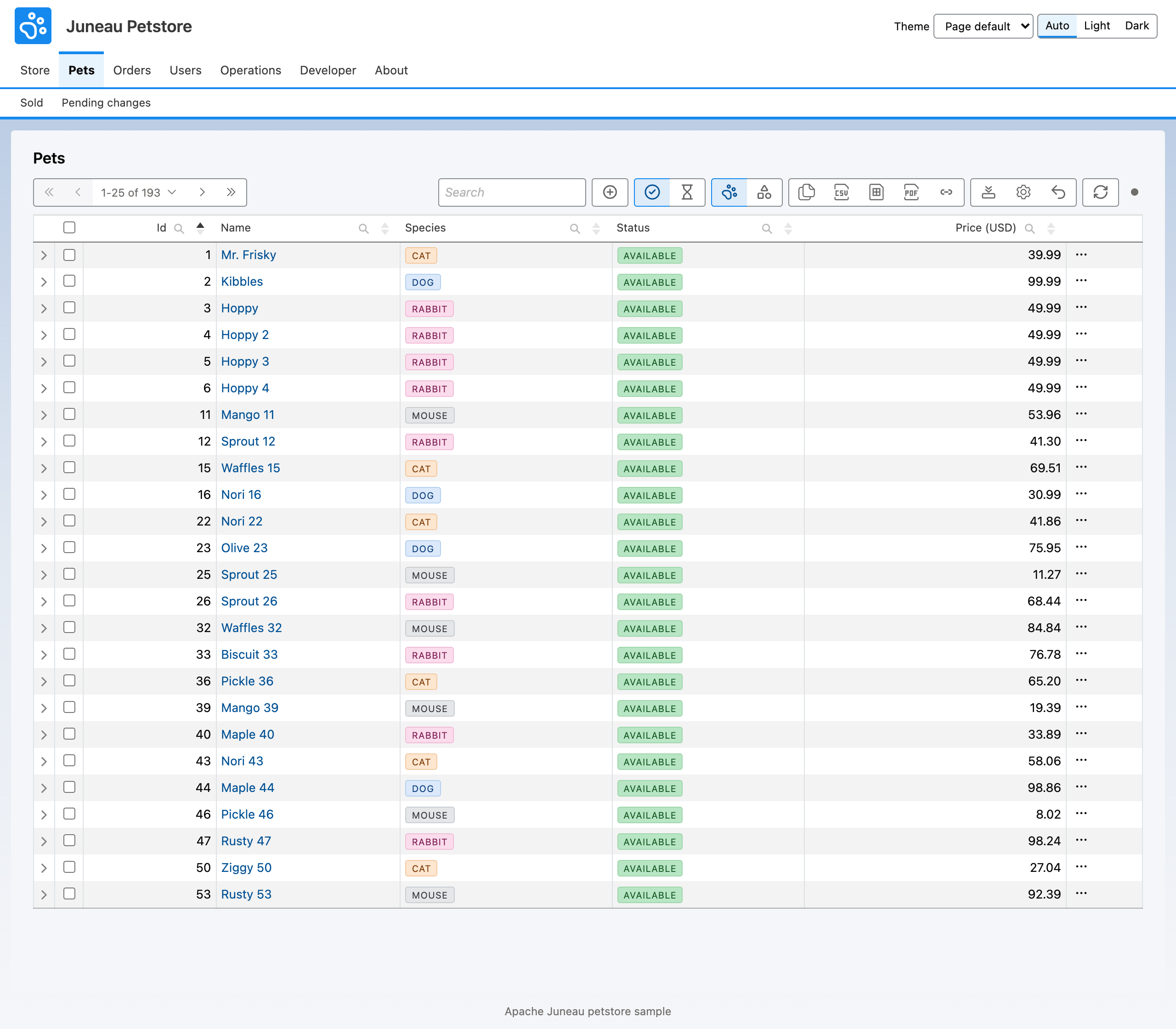
- Server mode. The table posts a DataTables request to
/console/pets/query.PetsRest.queryruns it against the pet collection withDataTablesQuery.run, so searching and ordering are BeanQuery expressions evaluated on the server. A malformed search expression comes back as a 200 response carrying anerrorenvelope, so the table can show the message instead of failing. - Ribbon. Built on
Ribbons.standard()(search, copy, CSV, Excel, PDF, copy link, columns, reset, refresh) with two option groups ("Pet status" with Available and Pending, and "Species" with Mammals and Others) that set column filters and an "+ Add pet" dialog button. - Row actions. Edit (a dialog form, merges the row on success) and Delete (with a confirmation).
- Selection and bulk. Rows can be selected across pages, except sold pets, which carry the reason "Already
sold." The bulk action "Mark sold" calls
POST /console/pets/{id}/sellonce per selected row. - URL state. The
idsURL-state directive carries a comma-separated list of pet ids in the page URL. The query endpoint accepts it as?ids=and narrows the rows to those ids before the column filters apply. - Polling. The table refreshes every 30 seconds and pauses while a cell is being edited.
Template
The template is pets.ftlh. The excerpt keeps the data mode, the URL state and the bulk definition.
<@card type="datatables" id="pets" title="Pets">
{
  rowType: 'Pet',
  dataMode: 'server',
  dataUrl: '/console/pets/query',
  urlState: { ids: {} },
  pollIntervalMs: 30000,
  selection: { rowIdField: 'id', selectAll: true, scope: 'persistent', labelField: 'name',
    selectableWhen: [ { field: 'status', op: 'ne', value: 'SOLD', reason: 'Already sold.' } ] },
  bulk: { actions: [
    { id: 'sell', label: 'Mark sold', endpoint: '/console/pets/{id}/sell', method: 'POST', bulkMode: 'perRow',
      confirmTitle: 'Mark pets sold', onSuccess: 'redraw' } ] }
}
</@card>
Builder twin
PetsPageBuilders.pets builds the same table. Selection and bulk are two separate opt-ins; the bulk definition is
created from a WritePermit and the selection it applies to.
var selection = SelectionDef.create("id").selectAll(true).scope(SelectionDef.Scope.PERSISTENT).labelField("name")
    .selectableWhen(RowActionEnabledRule.of("status", Op.NE, "SOLD", "Already sold."));
TableSpec.create("pets").rowType("Pet").dataMode(DataMode.SERVER).dataUrl("/console/pets/query")
    .urlState("ids").pollIntervalMs(30_000)
    .selection(selection)
    .bulk(BulkMutateDef.create(WritePermit.forCapability("pets.sell"), selection).actions(
        RowAction.create("sell").label("Mark sold").endpoint("/console/pets/{id}/sell")
            .method(Method.POST).bulkMode(BulkMode.PER_ROW).onSuccess(OnSuccess.REDRAW)));
The ?mixed variant
Request /console/pets?mixed and the page is "half FTL": pets-mixed.ftlh lays out the page and places the table
with <@card ref="pets"/>, while the table itself comes from PetsPageBuilders.petsMixed(). Both paths share one
petsTable() method, so they cannot drift. Use this shape when you want a hand-written layout around a
builder-defined card. ?builder renders the all-builder page, and ?builder&mixed renders the mixed one through the
builder path.
Per-row and aggregate bulk
The Pets bulk action is in perRow mode: the browser submits N independent single-row requests to the same sell
endpoint, each with its own result. The other mode, aggregate, sends one request listing every selected id
and expects one BulkResult back, with a per-id outcome. The request body is a BulkRequest: the ids, plus an
idempotencyKey so a retried submit never double-applies. The petstore uses the aggregate shape on the Pending
changes page, not here; see Petstore: Pending Changes. Selection and bulk
mutation are introduced in Rich Table Views: Actions.
Source and tests
Source: juneau-petstore/juneau-petstore-core, classes PetsRest and PetsPageBuilders (in the pages package),
and the templates pets.ftlh, pets-mixed.ftlh and fragments/pets.ftlh.
Tests: PetsRest_Test (query paging and counts, ?ids=, sell and its 409 conflict), PetstorePages_ContractTest
(the page contract, including the ids URL state) and PetstoreTwins_Test (template, builder and ?mixed agree).
See also
- Twin pattern: see 19.17. Template and Builder Twins.
- Petstore: Pet Detail: where a pet name links.
- Petstore: Sold Pets: the client-mode counterpart.
- Data Tables: the request and response envelopes, and
DataTablesQuery. - Rich Table Views: Actions: row actions, selection and bulk mutation.
- Data Table View Settings: column configuration and URL state.
- Rich Table Views: the view contract.