Using with HTML Beans
The HtmlFlavorRest class in the petstore console (the Html subtab at /console/dev/flavors/html) shows how HTML5 beans can be used to generate arbitrary HTML on REST endpoints.
table
The fragment() method, served at /console/dev/flavors/html/fragment, shows an example of
rendering an HTML table, built from live petstore data.
@RestGet(path="/fragment", serializers=HtmlSerializer.class)
public Table fragment() {
    var rows = new ArrayList<Object>();
    rows.add(tr(th("Name"), th("Species"), th("Price"), th("Status")));
    for (var r : FlavorPets.rows(store()))
        rows.add(tr(td(r.get("name")), td(r.get("species")), td(r.get("price")), td(r.get("status"))));
    return table(rows.toArray()).class_("petstore-flavor").attr("data-flavor", "html");
}
This is the fragment in a browser:
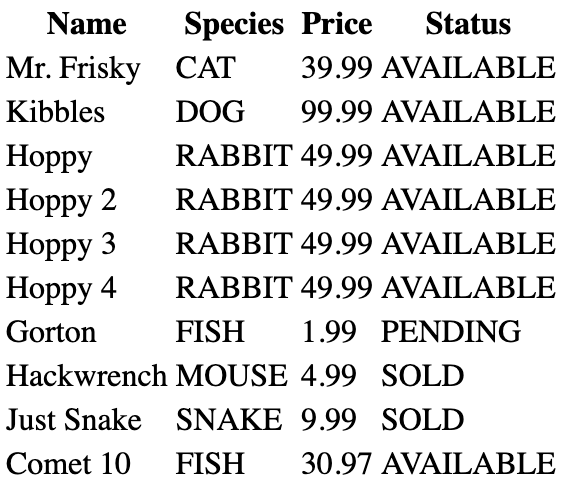
The endpoint is limited to HtmlSerializer, so it has no JSON representation; the beans themselves serialize to
JSON like any other bean when an endpoint allows it.
div
The following method shows an example of rendering a div tag with mixed content. (The petstore console has no per-pet card endpoint; this illustrates the bean API directly.)
@RestGet("/card")
public Div aCard() {
    return div(
        p(b("Rex")),
        p("Species: Dog"),
        p("Price: $100"),
        p("Status: AVAILABLE")
    );
}
form
The following method shows an example of rendering an HTML form using the Form HTML5 bean. (The petstore samples don't currently host a form-bean demo resource; this illustrates the bean API directly.)
@RestGet
@HtmlDocConfig(
    aside={
        "",
        "	Example of serialized org.apache.juneau.bean.html5.Form bean.",
        ""
    }
)
public Form aForm() {
    return form().action("/submit").method("POST")
        .children(
            "Position (1-10000): ", input("number").name("pos").value(1), br(),
            "Limit (1-10000): ", input("number").name("limit").value(100), br(),
            button("submit", "Submit"), button("reset", "Reset")
        );
}