View Settings and Shareable Links
A view table lets each user adjust how a table looks and keep those choices, and lets them share what they are looking at. These are two separate facilities that persist in different places.
View Settings
The View Settings dialog (provided by juneau-config.js) has four tabs: View, Search, Sort and Options. It lets
the user change the visible columns, their labels, format and order, which columns are searchable and sortable,
the page size and wrapping.
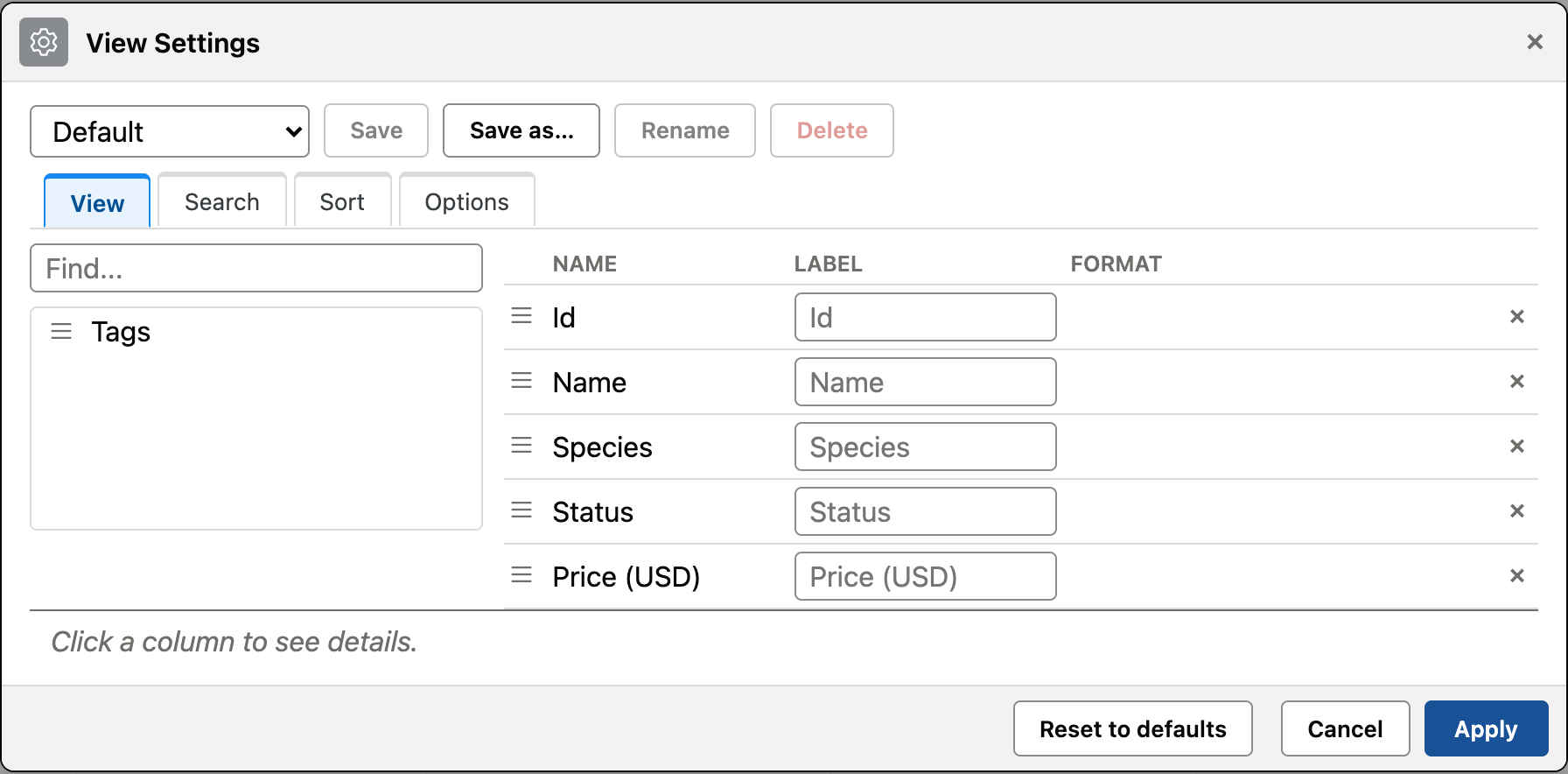
- The dialog title carries a gear icon. On the View tab, the left pane lists the columns that are not shown, with a
Find...box; every row there and every selected column has a drag grip. Drag an available column onto the selected grid to show it (drop on a row to insert it before or after that row, or on empty space to append it). Double click or Enter still adds it too. - A detail strip under the View tab shows facts about the column you last clicked or focused: its name, data key,
whether it is sortable and searchable, its formats, whether it is shown by default, and the optional
Column.descriptiontext from the catalog. - Reset to defaults is a bordered button next to Cancel and Apply. The saved-views row is one line: the view
drop-down, Save, Save as..., Rename and Delete. Rename and Delete are disabled while a built-in view such as
Defaultis selected. - Apply commits the settings to the page-state store, keyed per table, so several tables on one page never overwrite each other. A reload restores them.
- Settings are stored through
JuneauViews.pageState(see JavaScript API), not in the address bar. - The dialog starts from the catalog defaults, and the saved blob is overlaid on top of them.
- Saved view names have a maximum length, and
Defaultis a reserved name.
For the dialog's tabs, the schemaVersion guard, settings applied on load, the Sort tab, auto-refresh and the Copy link
button, see Datatable View Settings.
To keep settings somewhere other than browser localStorage, install a store with
JuneauViews.pageState.useStore({getItem, setItem, removeItem}), or supply a persistence provider through
JuneauViews.setPersistenceProvider(provider).
Copy link and shareable state
Copy link builds a URL for what the user is currently looking at: the selected tab, the active filters and the
sort. The state is one readable ?state= query parameter, placed directly in the address bar.
JuneauViews.urlState.buildShareUrl(location, state)always includes?state=, even when the clean-address option is on.JuneauViews.urlState.copy(navigator, text)writes to the clipboard and resolvestrueorfalse; it never throws where the Clipboard API is absent or denied.- The catalog's
cleanAddresskey keeps the live address bar free of?state=; Copy link still produces the full URL. - The view's
urlStatekey (TableSpec.urlState(String...), orurlState: {day: {}}in a catalog) enables built-in directives.daycarriesday(YYYY-MM-DD)in?state=and restricts the table to rows whose date falls in that calendar day's[start, end)window; a malformed or impossible date is ignored. The server resource receives the value as adayquery parameter by default; to use another name, callTableSpec.urlStateDayParam("on")(or seturlState: {day: {param: "on"}}in a catalog), and the request carriesoninstead. Views without the key behave as before.
Open precedence
When a page opens with ?state=, that state wins over the browser store for tab, filters and sort. It does not
replace the recipient's saved View Settings: those are a separate store facet that the URL codec never touches.
So a shared link shows the sender's filters and sort, laid out with the recipient's own column choices.
The views toolkit pack includes juneau-urlstate.js, so <@page toolkit="views"> pages get Copy link
automatically. A hand-built page that uses Copy link must load ViewsMixin.URLSTATE_JS_PATH itself, after
juneau-pagestate.js.